Start here
Free
$01 location · Up to 25 variants · No trial required
- Inventory forecasts
- Reorder quantities with the math shown
- Create, send and receive purchase orders
- Supplier lead times & case packs
Stock Perfect turns your Shopify sales history and supplier lead times into reorder quantities, and shows the math behind every one.
See which products need attention before your next supplier order.
Switching from Stocky
Shopify keeps read-only access to Stocky open for at least 90 days after shutdown so you can export your data. Save your reports now, then pick up planning in Stock Perfect.
Import saved Stocky report files and supplier spreadsheets.
Supplier records can’t be exported from Stocky. Add lead times, minimum orders and case packs as you go.
See what to reorder with the math shown, then draft, send and receive purchase orders.
What you get
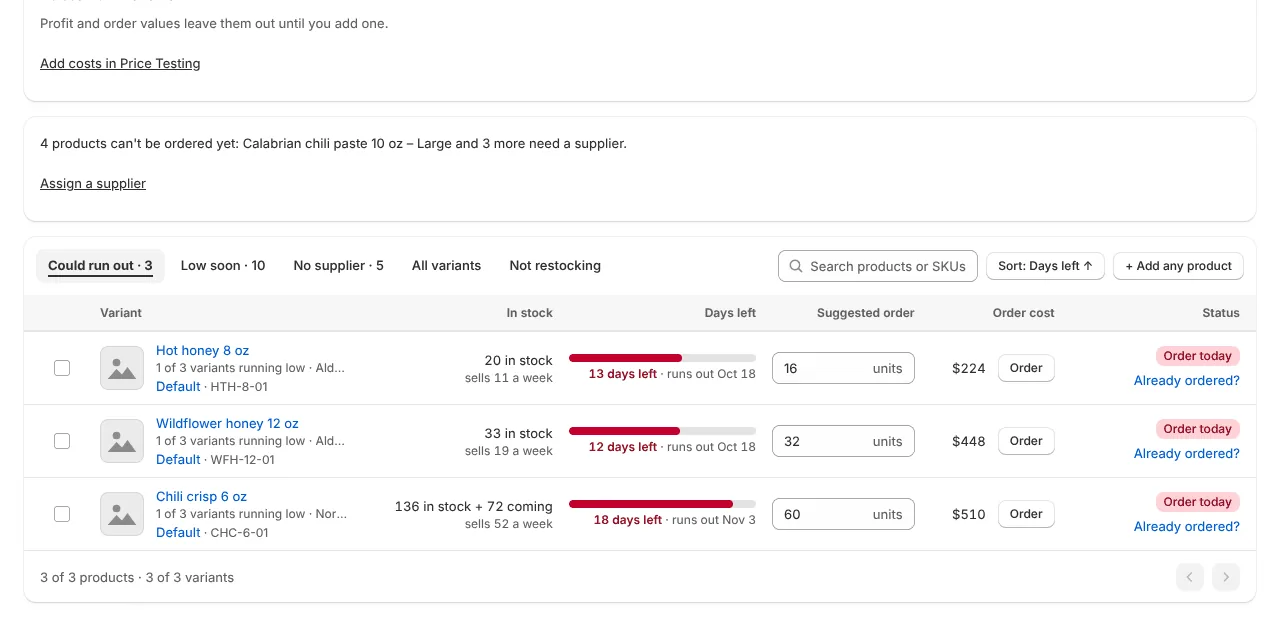
Restock
See what could run out, when, and how much to order. Suggestions use your sales, stock and supplier lead times.

Restock opens on what needs attention today.
Why this number
Open a suggestion to see the demand, lead time, stock and supplier rules behind it. Adjust the quantity before adding it to a purchase order.

Every suggestion opens with the order and the reasons behind it.
Purchase orders
Draft, send and receive purchase orders in one place. Send by email, download a PDF or export to Google Sheets on paid plans.

Purchase orders, from draft to delivery, in one place.
How it works
Install Stock Perfect from the Shopify App Store. We connect to your Shopify products, inventory and sales history.
Add lead times, minimum orders and case packs. Your suggestions use the rules you enter for your suppliers and products.

See the quantities and order dates our engine calculates for every product. Review the math, then turn your forecast into a supplier order.
Pricing
Start here
1 location · Up to 25 variants · No trial required
When you need more
Upgrade inside the app. Billed through Shopify.
Prices in USD. Compare all plans on Shopify.

Built on the merchant side
We built Stock Perfect for The Meatery, our online meat retailer. Popular cuts sold out during seasonal peaks while slower products sat in freezer storage. The order-planning spreadsheets couldn’t keep up.
Stock Perfect grew out of that work: a way to see what needs ordering and understand the numbers before committing to it.
Stock Perfect and The Meatery share an owner. This is our own story, not an independent review.
You can import saved Stocky report files and supplier spreadsheets. Supplier settings may still need to be entered separately.
Yes. The Free plan includes reorder planning for up to 25 variants, suppliers and purchase orders at one location. Paid plans include a 14-day free trial and are billed through Shopify.
Install the app, choose your planning locations and enter a typical supplier lead time. Add supplier-specific lead times, minimum orders and case packs as you go.
Stock Perfect uses sales history, current stock, stock on order and your supplier settings to calculate suggested quantities. Open a suggestion to see the math, then review or change the quantity before creating a purchase order.
Our engine combines OptimizedTheta with AutoETS for products with regular demand. It accounts for seasonal patterns, supplier lead times and stock availability, and uses different methods for occasional sales and new products. Every suggested quantity shows its calculation. See the methods behind the math.
Stock Perfect plans reorders for perishable brands, but it does not track shelf life, lot numbers or expiry dates, or cap an order by shelf life.
Connect your Shopify store. Set your supplier rules. See your stock with a little more clarity.